Download esptoo
https://github.com/espressif/esptool/releases
#pip install esptool
#git clone git@github.com:marcelstoer/nodemcu-pyflasher.git
#git clone https://github.com/espressif/esptool.git /tmp/esptool

wget https://github.com/espressif/esptool/releases/download/v4.7.0/esptool-v4.7.0-linux-amd64.zip -q -O /tmp/esptool.zip
unzip /tmp/esptool.zip -d /tmp
chmod +x /tmp/esptool-linux-amd64/esptool
Download ahoy firmware
https://github.com/lumapu/ahoy/releases
https://fw.ahoydtu.de/fw/release/
# dev
#URL=https://nightly.link/lumapu/ahoy/workflows/compile_development/development03/ahoydtu_dev.zip

# stable
AHOY_RELEASE=0.8.156
URL=https://github.com/lumapu/ahoy/releases/download/ahoy_v${AHOY_RELEASE}/ahoy_v${AHOY_RELEASE}.zip

wget ${URL} -q -O /tmp/ahoydtu.zip

# extract
unzip /tmp/ahoydtu.zip -d /tmp
Flash Ahoy DTU
# get chip id
sudo  /tmp/esptool-linux-amd64/esptool   --port /dev/ttyUSB0   --baud 115200  chip_id | grep "Chip is"

# Flash firmware
# ESP8266 (Wemos D1 Mini / ESP8266EX)
AHOY_FW=/tmp/ESP8266/2*_esp8266-minimal.bin
# ESP32 (ESP32 WROOM32)
AHOY_FW=/tmp/ESP32/*_esp32-wroom32.bin
# opendtu-generic_esp32.factory.bin

sudo chmod 777  /dev/ttyUSB0

eval /tmp/esptool-linux-amd64/esptool \
  --port /dev/ttyUSB0 \
  --baud 115200 \
  --after hard_reset \
  write_flash \
  --flash_size detect \
  --flash_mode dio \
  --erase-all \
  0x00000 \
  "${AHOY_FW}"

# ESP32 (ESP32 WROOM32)
#/tmp/esptool/esptool.py --port /dev/ttyUSB0 --chip esp32 --before default_reset --after hard_reset   write_flash --flash_mode dout --flash_freq 40m --flash_size detect   0x1000 bootloader.bin   0x8000 partitions.bin   0x10000 230927_ahoy_0.7.60_963e618_esp32.bin


# esptool.py --port /dev/ttyUSB0 --chip esp32 --before default_reset --after hard_reset \
  write_flash --flash_mode dout --flash_freq 40m --flash_size detect \
  0x0 opendtu-generic*.factory.bin
Wiring ESP8266
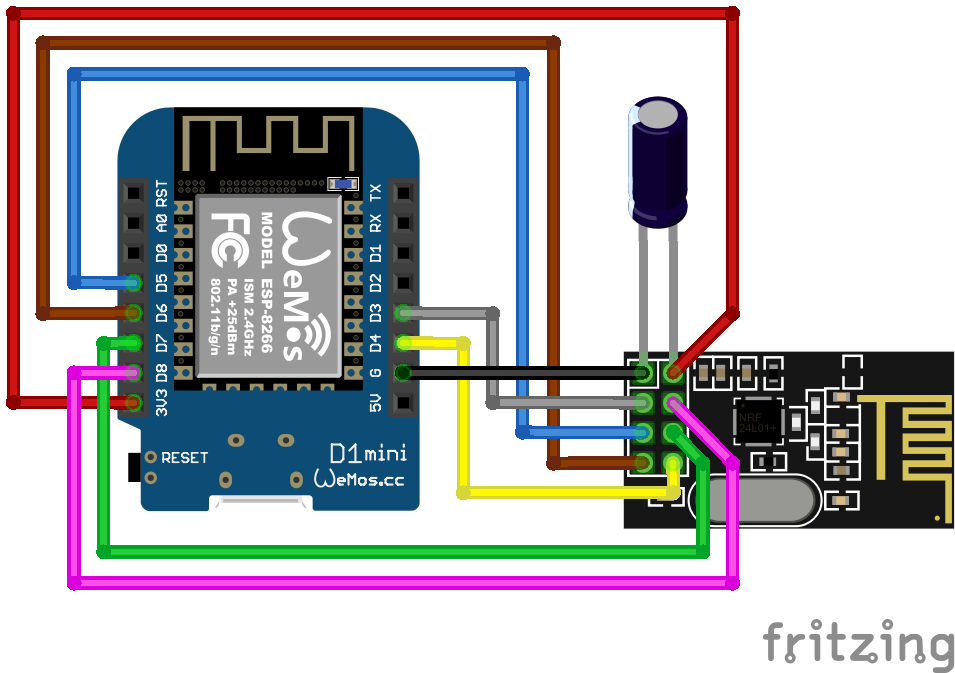
Image copyright:AhoyDTU.de
Wiring ESP32
# https://ahoydtu.de/img/fritzing/esp32-38_nrf_ssd1306.png
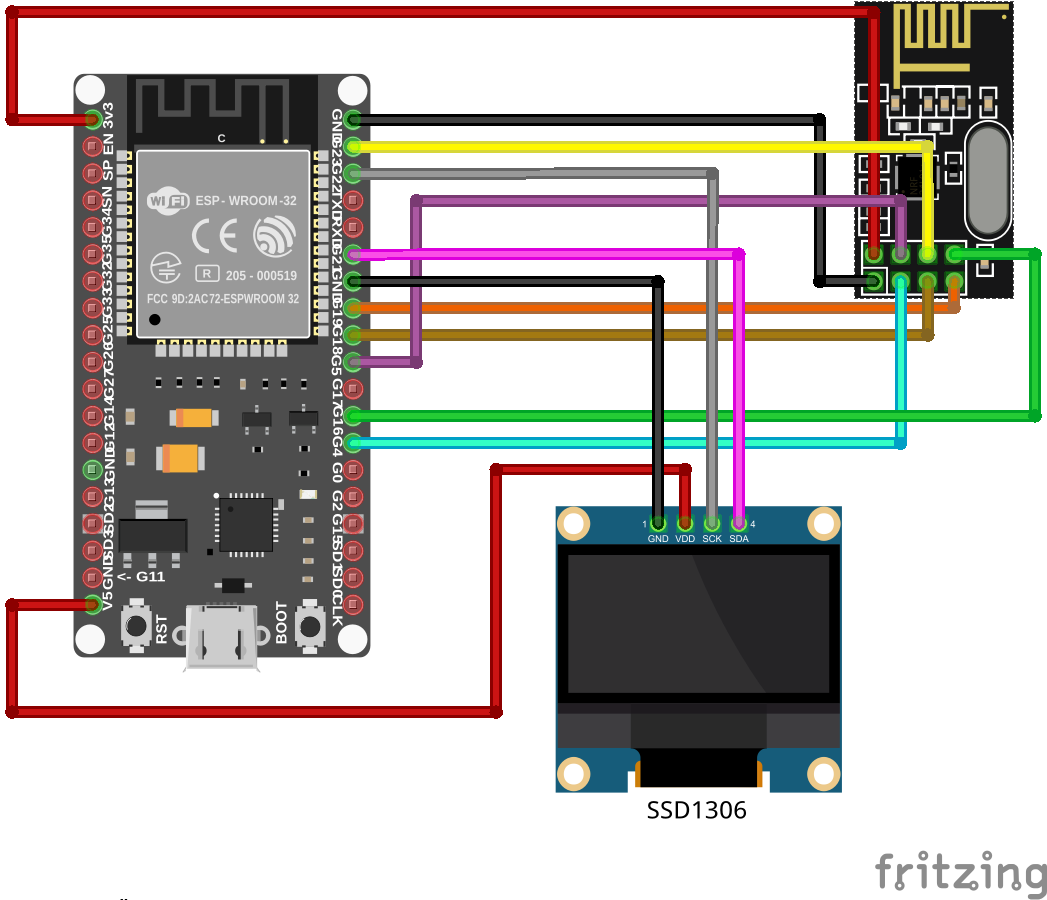
Image copyright:AhoyDTU.de
Configure
conneect to  wifi
wifi: AHOY-DTU
pass: esp_8266Optional: Flash with GUI
cd nodemcu-pyflasher
./nodemcu-pyflasher.py

Serial port: /dev//ttyUSB0
ModeMCU firmware: 230617_ahoy_0.7.6_0b763df_esp8266.bin
Baud rate 1115200
Flash mode Dual I/0 (DIO)
Erase flash (yes,  wipes all data
Flash NodeMCU
Debug
sudo screen /dev/ttyUSB0 115200
OpenDTU
https://www.opendtu.solar/
https://selbstbau-pv.de/wissensbasis/opendtu-einrichtung/
https://blog.helmutkarger.de/balkonkraftwerk-teil-8-opendtu-und-ahoydtu-fuer-hoymiles-wechselrichter/
WLAN-Spot „OpenDTU-*****“
Passwort: openDTU42

# login
admin
openDTU42

# firmware
# opendtu-generic.bin
https://github.com/tbnobody/OpenDTU/releases

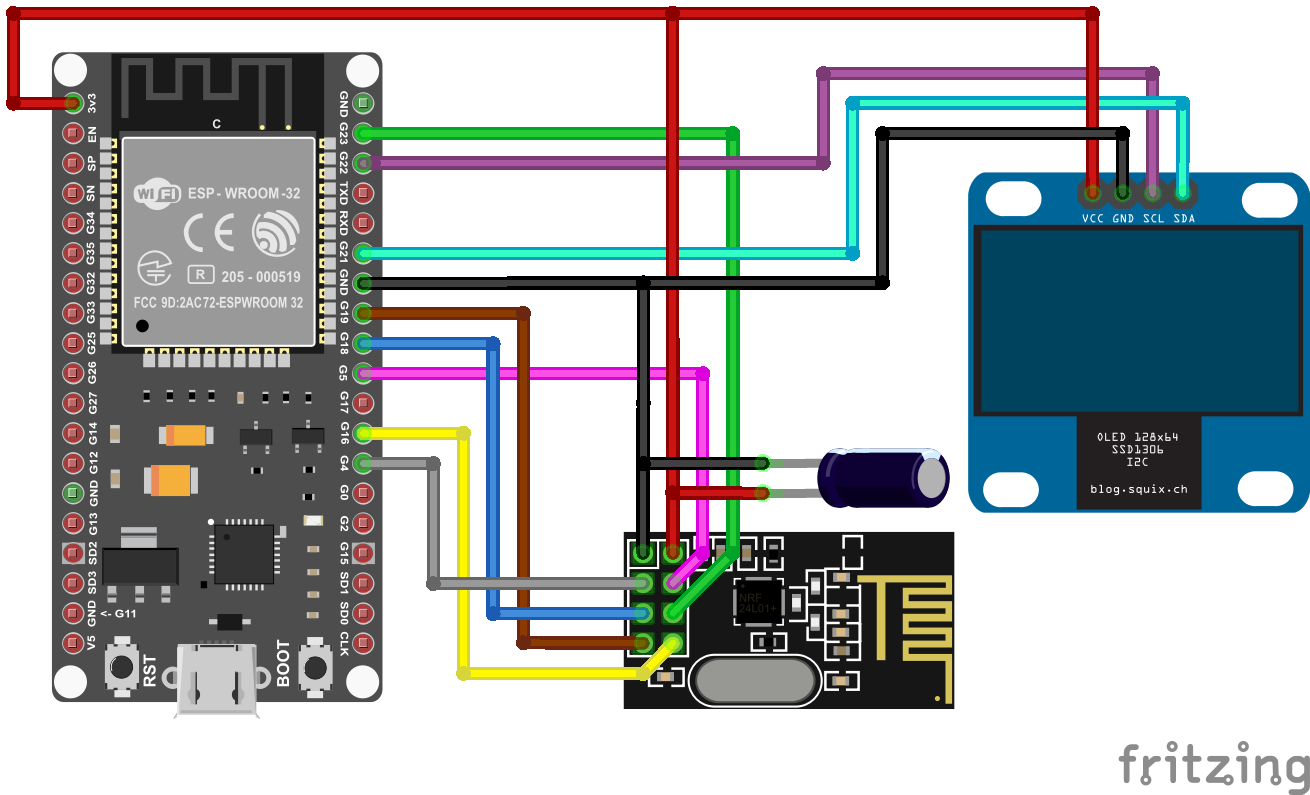
# wiring
https://blog.helmutkarger.de/wp-content/uploads/ESP32mitDisplay.png
Limit inverter max power from Homeassistant
type: button
name: Battery 50W
icon: mdi:battery
tap_action:
  action: perform-action
  perform_action: mqtt.publish
  data:
    topic: inverter/ctrl/limit/0
    payload: 50W
Disable inverter max power from Homeassistant
type: button
name: Battery On/Off
icon: mdi:battery
tap_action:
  action: perform-action
  perform_action: mqtt.publish
  data:
    topic: inverter/ctrl/power/3
    payload: 0
Links
https://ahoydtu.de/
https://github.com/lumapu/ahoy/releases
https://blog.helmutkarger.de/balkonkraftwerk-teil-8-opendtu-und-ahoydtu-fuer-hoymiles-wechselrichter/
https://howtomechatronics.com/tutorials/arduino/arduino-wireless-communication-nrf24l01-tutorial/
https://ahoydtu.de/getting_started/
https://github.com/marcelstoer/nodemcu-pyflasher