
Primary links

  • Home
  • AI
  • Kubernetes
  • Incus
  • Ansible
  • Terraform
  • OpenStack
  • Virtualization
  • Linux
  • SmartHome
  • HowTo

Misc

  • Linux
  • Hardware
  • Programming
  • Databases
  • CLI
  • Multimedia
  • Plugins
  • Windows

Cloud

  • OpenStack
  • cloud-config
  • nextcloud

Virtualization

  • Virtualization
  • Docker
  • KVM
  • Kubernetes
  • LXC
  • LXD
  • QEMU
  • VMware
  • VirtualBox
  • multipass
  • podman
  • vagrant
  • XEN
  • Incus

Network

  • DNS
  • Firewall
  • Linux
  • OpenvSwitch
  • SSL
  • VLAN
  • VPN
  • iPXE
  • namespaces
  • nmcli
  • tcpdump

Storage

  • CEPH
  • DRBD
  • LVM
  • S3
  • ZFS
  • btrfs

Automation / CI/CD

  • Install
  • Ansible
  • GitLab
  • LLM
  • Preseed
  • Puppet
  • Terraform
  • Ubuntu autoinstall

Monitoring / Visualisation

  • Grafana
  • Icinga
  • Prometheus
  • Monitoring
  • ELK
  • mermaid

DAIKIN Altherma M HW

DAIKIN Altherma M HW 200 EKHHE200PCV37 / FERROLI - EGEA TECH LT
https://www.daikin.eu/en_us/products/product.html/EKHHE-PCV37.html
https://www.ferroli.com/media/3540000410_03_EGEA_TECH_200%20LT%20-%20260%20LT%20-%20200%20LT-S%20-%20260%20LT-S.pdf

Manual
https://www.daikin.eu/content/dam/document-library/installation-manuals/heat/domestic-hot-water-heat-pump/EKHHE-PCV37_User,%20Installations%20and%20Maintenance%20Manual_digital.pdf

RS485 module with ESP32
https://de.aliexpress.com/item/1005009583388691.html - TTL Turn RS485 485 to Serial UART Level Mutual Conversion Hardware Automatic Flow Control Board Module XY-017
https://github.com/lorbetzki/Daikin-EKHHE
https://github.com/jcappaert/esphome-daikin-ekhhe
https://www.bizkit.ru/en/2019/02/21/12563/
https://how2electronics.com/how-to-use-modbus-rtu-with-esp32-to-read-sensor-data/

ESPhome
https://esphome.io/guides/troubleshooting/

Home Assistant ustreamer

Video Capture AV USB card (ARKMICRO 18ec:5555) / dmesg

[141319.682908] usb 1-1.4: New USB device found, idVendor=18ec, idProduct=5555, bcdDevice= 1.00
[141319.682941] usb 1-1.4: New USB device strings: Mfr=1, Product=2, SerialNumber=0
[141319.682955] usb 1-1.4: Product: USB2.0 PC CAMERA
[141319.682966] usb 1-1.4: Manufacturer: ARKMICRO
[141319.685776] usb 1-1.4: Found UVC 1.00 device USB2.0 PC CAMERA (18ec:5555)

TODO: Fix device permissions

chmod 0666 /dev/video0

# cat /etc/udev/rules.d/99-camera.rules
# DEVNAME="/dev/video0",MODE="0666"

Create container
https://hub.docker.com/r/mkuf/ustreamer

docker run -d \
  --name ustreamer \
  --restart always \
  -p 8082:8080 \
  --device /dev/video0:/dev/video0 \
  mkuf/ustreamer:latest

Stream
http://ha:8080/?action=stream

Debug

docker run -ti -p 8082:8080 --device /dev/video0:/dev/video0 --entrypoint=sh mkuf/ustreamer:latest
./ustreamer --device=/dev/video0 --host=0.0.0.0 --port=8080

Links
https://github.com/pikvm/ustreamer

LineageOS 21 / Android 14 on Samsung Galaxy A51

TWRP 3.7.0 on Samsung Galaxy A51 SM-A515F
https://www.recovery-mode.com/twrp/how-to-flash-twrp-3-7-0-on-samsung-galaxy-a51-sm-a515f-android-13-u8-a515fxxu8hwi1-firmware.html
https://www.youtube.com/watch?v=_-Opl8fKUAE

Odin3_v3.14.4.zip
Root_A51_U8_androidhowto.tar

# download to SD card from Telegram
DynaPatch-V2.0.zip
Disable_Dm-Verity_ForceEncrypt_03.04.2020.zip
multidisabler-samsung-3.1.3.zip

adb reboot recovery

LineageOS 21 / Android 14 ROM for Samsung Galaxy A51
https://www.recovery-mode.com/custom-rom/lineageos-21-unofficial-android-14-rom-for-samsung-galaxy-a51-update-240424.html
https://drive.google.com/drive/folders/1LqIfbjuEhngEMTNGa5SOPqoGgDyCDs5n

lineage-21.0-20240424-UNOFFICIAL-a51.zip

Install minimal PlayStore with NikGapps for Android 14(U)
https://nikgapps.com/downloads#downloads
https://sourceforge.net/projects/nikgapps/files/Releases/NikGapps-U/07-Nov-2023/NikGapps-core-arm64-14-20231107-signed.zip/download

NikGapps-core-arm64-14-20231107-signed.zip

Install Android Auto
https://sourceforge.net/projects/nikgapps/files/Releases/Addons-U/07-Nov-2023/

NikGapps-Addon-14-AndroidAuto-20231107-signed.zip

Install all zip files in TWRP recovery then reboot the phone

OpenStack GPU passthrough

Enable iommu in BIOS

Get MMUI groups

shopt -s nullglob
for g in $(find /sys/kernel/iommu_groups/* -maxdepth 0 -type d | sort -V); do
    echo "IOMMU Group ${g##*/}:"
    for d in $g/devices/*; do
        echo -e "\t$(lspci -nns ${d##*/})"
    done;
done;

Configure compute node

NVIDIA_PCI_ID=$(lspci -nn | grep NVIDIA | cut -d "[" -f3 | cut -d "]" -f1)

echo "blacklist nouveau" >> /etc/modprobe.d/blacklist-nvidia.conf
echo "blacklist nvidiafb" >> /etc/modprobe.d/blacklist-nvidia.conf
echo vfio-pci >> /etc/modules-load.d/vfio-pci.conf
# configure all PCI IDs (also Audio device from same MMUI group as ids=10de:xxxx,10de:xxxx
echo options vfio-pci ids=${NVIDIA_PCI_ID} >> /etc/modprobe.d/gpu-vfio.conf

#sed -i 's/GRUB_CMDLINE_LINUX_DEFAULT=.*/GRUB_CMDLINE_LINUX_DEFAULT="amd_iommu=on iommu=pt"/g' /etc/default/grub

cat < /etc/default/grub.d/gpu.cfg
GRUB_CMDLINE_LINUX_DEFAULT="\$GRUB_CMDLINE_LINUX_DEFAULT amd_iommu=on iommu=pt kvm.ignore_msrs=1 default_hugepagesz=2M hugepagesz=1G hugepages=160 hugepagesz=2M hugepages=2048 transparent_hugepage=never"
EOF


update-grub

reboot
#/etc/modprobe.d/kvm.conf
#options kvm ignore_msrs=Y

#echo "options vfio-pci ids=${NVIDIA_PCI_ID}" >> /etc/modprobe.d/vfio.conf
#echo "softdep drm pre: vfio-pci" >> /etc/modprobe.d/vfio.conf
#echo "options kvm ignore_msrs=1" >> /etc/modprobe.d/kvm.conf
#echo "vfio vfio_iommu_type1 vfio_virqfd vfio_pci ids=${NVIDIA_PCI_ID}" >> /etc/initramfs-tools/modules
#echo GRUB_CMDLINE_LINUX_DEFAULT=\"intel_iommu=on vfio-pci.ids=${NVIDIA_PCI_ID} vfio_iommu_type1.allow_unsafe_interrupts=1 modprobe.blacklist=nvidiafb,nouveau\" >> /etc/default/grub
#echo GRUB_CMDLINE_LINUX_DEFAULT=\"amd_iommu=on vfio-pci.ids=${NVIDIA_PCI_ID} vfio_iommu_type1.allow_unsafe_interrupts=1 modprobe.blacklist=nvidiafb,nouveau\" >> /etc/default/grub
#echo 'GRUB_CMDLINE_LINUX_DEFAULT="amd_iommu=on kvm.ignore_msrs=1 vfio-pci.ids=10de:27b8"' >> /etc/default/grub
#echo 'GRUB_CMDLINE_LINUX_DEFAULT="amd_iommu=on kvm.ignore_msrs=1"' >> /etc/default/grub

# iommu=pt

Test whather vfio driver is loaded

Logitech Squeezebox Touch

SSH login
Enable first SSH on the Logitech Squeezebox Touch

ssh -oKexAlgorithms=+diffie-hellman-group1-sha1 -oPubkeyAcceptedKeyTypes=+ssh-rsa -oHostKeyAlgorithms=+ssh-rsa -c aes128-cbc root@192.168.178.120

# pass: 1234

Surface

Boot Ubuntu

Hold down the Volume Up button and push down the power button, but release the power button while still holding down the Volume Up button. Once the 'Surface UEFI' screen appears, you can release the Volume Up button. You should see a screen similar to Figure

Boot Configuration
 drag-and-drop 'USB Storage' to the top.

 Secure Boot option. So, click on 'Security' in

Links
https://support.microsoft.com/en-us/surface/creating-and-using-a-usb-recovery-drive-for-surface-677852e2-ed34-45cb-40ef-398fc7d62c07#bkmk_download11
https://www.microsoft.com/en-us/legal/compliance/energy

Raspberry Pi

Creeate boot SD card
https://www.raspberrypi.com/software/

sudo apt install rpi-imager

Configure WLAN
https://raspberrypi.stackexchange.com/questions/79613/raspbian-static-ip-for-eth0-and-dhcp-for-wlan0
https://www.elektronik-kompendium.de/sites/raspberry-pi/1912221.htm

# at workstation
WIFI_SSID="$(nmcli dev wifi show-password | grep SSID | cut -d' ' -f2-)"
WIFI_PASS="$(nmcli dev wifi show-password | grep Pass | cut -d' ' -f2-)"

wpa_passphrase "${WIFI_SSID}" "${WIFI_PASS}" | sudo tee -a /etc/wpa_supplicant/wpa_supplicant.conf

# /etc/network/interfaces
# static
#allow-hotplug wlan0
#iface wlan0 inet static
#address 192.168.1.100
#netmask 255.255.255.0
#gateway 192.168.1.254

# dhcp
allow-hotplug wlan0
iface wlan0 inet dhcp
    wpa-conf /etc/wpa_supplicant/wpa_supplicant.conf

Enable MPEG decoder

mount -o remount,rw /flash/
LICENSE_KEY=0x12345678
sed -i "s|^#.*decode_MPG2=0x.*$|decode_MPG2=${LICENSE_KEY}|g" /flash/config.txt
reboot

Fix HDMI: force HDMI even if unplugged or powered off

mount /flash -o remount,rw
sed -i 's|#.*hdmi_force_hotplug=1|hdmi_force_hotplug=1|' /flash/config.txt

Images
https://www.raspberrypi.org/downloads/

Raspbian (Debian Jessie)

sudo umount /dev/mmcblk0*
wget -q http://director.downloads.raspberrypi.org/raspbian/images/raspbian-2016-02-29/2016-02-26-raspbian-jessie.zip -P /tmp
unzip -p /home/pako/Downloads/2016-02-26-raspbian-jessie.zip | sudo dd of=/dev/mmcblk0
sync

wget -q http://director.downloads.raspberrypi.org/raspbian_lite/images/raspbian_lite-2016-02-29/2016-02-26-raspbian-jessie-lite.zip -P /tmp

View used codecs

Tasmota on SONOFF Zigbee Bridge Pro

Flashing Tasmota on SONOFF Zigbee Bridge Pro
https://notenoughtech.com/home-automation/tasmota-on-sonoff-zb-bridge-pro/

Download
http://ota.tasmota.com/tasmota32/tasmota32-zbbrdgpro.bin

SonoffZBPro_coord
https://github.com/arendst/Tasmota/tree/development/tools/fw_SonoffZigbeeBridgePro_cc2652

Use ESP Flasher v.1.4.1
https://github.com/Jason2866/ESP_Flasher/releases/download/v.1.4.1/Ubuntu.zip

Flash LineageOS to Samsung Android phone

Samsung Galaxy Note 3 LTE (SM-N9005/P) hlte
https://download.lineageos.org/hlte

wget https://mirror.selfnet.de/lineageos/full/hlte/20200425/lineage-16.0-20200425-nightly-hlte-signed.zip -P /tmp

Samsung Galaxy Tab 2 7.0
https://forum.xda-developers.com/galaxy-tab-2/galaxy-tab-2-unified/rom-lineageos-14-1-t3661609
https://samfrew.com/de/download/Galaxy__Tab__2__7.0__WiFi__/355o/AUT/P3110XXDNE1/P3110AUTDNE1/
https://dl.twrp.me/p3110/twrp-3.1.1-0-p3110.img.html

Samsung GalaxyTab Pro SM-T520 LineageOS 17.1 on Android 10
https://forum.xda-developers.com/t/rom-sm-t520-sm-t900-unofficial-lineageos-17-1-android-10.4274047/

https://ava2.androidfilehost.com/dl/EZstcHbizmZt00wW1qfNXw/1650126526/12420606652095398156/twrp-3.2.1-0-n2awifi.img?
blob:https://mega.nz/e38a9ec3-035d-4a25-a1af-983be82f7462
https://netcologne.dl.sourceforge.net/project/opengapps/arm/20220215/open_gapps-arm-10.0-pico-20220215.zip

sudo apt install heimdall-flash

Vol- + Home + Power
heimdall flash --RECOVERY twrp-3.2.1-0-n2awifi.img --no-reboot
Vol+ + Home + Power

LineageOS 17.1 on Samsung Galaxy Tab PRO 10.1 / SM-T520 / n2awifi

ahoy / Open DTU

Download esptoo
https://github.com/espressif/esptool/releases

#pip install esptool
#git clone git@github.com:marcelstoer/nodemcu-pyflasher.git
#git clone https://github.com/espressif/esptool.git /tmp/esptool

wget https://github.com/espressif/esptool/releases/download/v4.7.0/esptool-v4.7.0-linux-amd64.zip -q -O /tmp/esptool.zip
unzip /tmp/esptool.zip -d /tmp
chmod +x /tmp/esptool-linux-amd64/esptool

Download ahoy firmware
https://github.com/lumapu/ahoy/releases
https://fw.ahoydtu.de/fw/release/

# dev
#URL=https://nightly.link/lumapu/ahoy/workflows/compile_development/development03/ahoydtu_dev.zip

# stable
AHOY_RELEASE=0.8.156
URL=https://github.com/lumapu/ahoy/releases/download/ahoy_v${AHOY_RELEASE}/ahoy_v${AHOY_RELEASE}.zip

wget ${URL} -q -O /tmp/ahoydtu.zip

# extract
unzip /tmp/ahoydtu.zip -d /tmp

Flash Ahoy DTU

# get chip id
sudo  /tmp/esptool-linux-amd64/esptool   --port /dev/ttyUSB0   --baud 115200  chip_id | grep "Chip is"

# Flash firmware
# ESP8266 (Wemos D1 Mini / ESP8266EX)
AHOY_FW=/tmp/ESP8266/2*_esp8266-minimal.bin
# ESP32 (ESP32 WROOM32)
AHOY_FW=/tmp/ESP32/*_esp32-wroom32.bin
# opendtu-generic_esp32.factory.bin

sudo chmod 777  /dev/ttyUSB0

eval /tmp/esptool-linux-amd64/esptool \
  --port /dev/ttyUSB0 \
  --baud 115200 \
  --after hard_reset \
  write_flash \
  --flash_size detect \
  --flash_mode dio \
  --erase-all \
  0x00000 \
  "${AHOY_FW}"

# ESP32 (ESP32 WROOM32)
#/tmp/esptool/esptool.py --port /dev/ttyUSB0 --chip esp32 --before default_reset --after hard_reset   write_flash --flash_mode dout --flash_freq 40m --flash_size detect   0x1000 bootloader.bin   0x8000 partitions.bin   0x10000 230927_ahoy_0.7.60_963e618_esp32.bin


# esptool.py --port /dev/ttyUSB0 --chip esp32 --before default_reset --after hard_reset \
  write_flash --flash_mode dout --flash_freq 40m --flash_size detect \
  0x0 opendtu-generic*.factory.bin

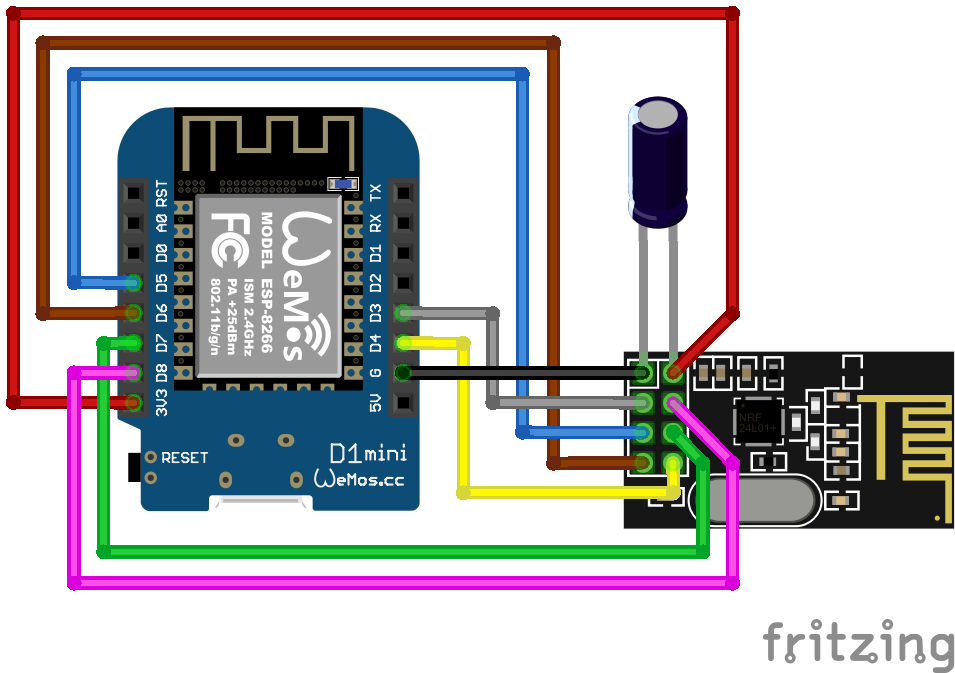
Wiring ESP8266

Image copyright:AhoyDTU.de

Pagination

  • 1
  • Next page
hardware
Profiles GitHub StackOverflow LinkedIn Xing
Contact Imprint
© panticz 2026

Cookie-Einstellungen

Diese Website nutzt eingebettete Inhalte von Drittanbietern (z.B. YouTube, SoundCloud). Beim Laden dieser Inhalte werden Daten an die jeweiligen Anbieter übermittelt. Datenverarbeitungserklärung