Primary links

  • Home
  • AI
  • Kubernetes
  • Incus
  • Ansible
  • Terraform
  • OpenStack
  • Virtualization
  • Linux
  • SmartHome
  • HowTo

Misc

  • Linux
  • Hardware
  • Programming
  • Databases
  • Multimedia
  • Windows

Cloud

  • OpenStack
  • cloud-config
  • nextcloud

Virtualization

  • Virtualization
  • Incus
  • Docker
  • KVM
  • Kubernetes
  • LXC
  • LXD
  • QEMU
  • VMware
  • VirtualBox
  • multipass
  • podman
  • vagrant
  • XEN

Network

  • DNS
  • Firewall
  • Linux
  • OpenvSwitch
  • SSL
  • VLAN
  • VPN
  • iPXE
  • namespaces
  • nmcli
  • tcpdump

Storage

  • CEPH
  • DRBD
  • LVM
  • S3
  • ZFS
  • btrfs

Automation / CI/CD

  • Install
  • Ansible
  • GitLab
  • LLM
  • Preseed
  • Puppet
  • Terraform
  • Ubuntu autoinstall

Monitoring / Visualisation

  • Grafana
  • Icinga
  • Prometheus
  • Monitoring
  • ELK
  • mermaid

Install LXC (Linux Containers) under Ubuntu

Installation

apt install -y bridge-utils debootstrap lxc-templates lxc

http://www.panticz.de/install_lxc

Create container

export LANG=en_US.UTF-8
export CONTAINER=wheezy

sudo sudo lxc-destroy -n ${CONTAINER}
sudo lxc-create -t debian -n ${CONTAINER}
sudo lxc-start -d -n ${CONTAINER}

echo 'Acquire::http::Proxy "http://apt-cacher:3142/";' | sudo tee /var/lib/lxc/${CONTAINER}/rootfs/etc/apt/apt.conf

sudo lxc-attach -n ${CONTAINER} -- apt-get clean
sudo lxc-attach -n ${CONTAINER} -- apt-get update
sudo lxc-attach -n ${CONTAINER} -- apt-get dist-upgrade -y
sudo lxc-attach -n ${CONTAINER} -- apt-get install -y wget vim

# start container in forderground
lxc-start -n vm1  -F

# optional
echo "lxc.start.auto = 1" | tee -a /var/lib/lxc/${CONTAINER}/config

# connect to container
ssh root@$(sudo lxc-info -i -H -n ${CONTAINER})

Install LXC from testing on Debian

echo "deb http://ftp.debian.org/debian testing main" >> /etc/apt/sources.list.d/testing.list
apt-get update
apt-get -t testing install -y lxc
sed -i 's|lxc.network.type = empty|lxc.network.type = veth|' /etc/lxc/default.conf
echo "lxc.network.link = lxcbr0" >> /etc/lxc/default.conf

Update LXC container templates

wget -q --no-check-certificate https://raw.githubusercontent.com/panticz/lxc/master/scripts/lxc-update-templates.sh -O - | sudo bash -

# required for fedora container
sudo apt-get install -y yum  curl

OPTIONAL: install wget and vim by default under debian

sed -i '/iproute/a wget,\\\nvim,\\' /usr/share/lxc/templates/lxc-debian

OPTIONAL: enable apt-cache

Create IPfire DomU (firewall)

Check for latest IPFire version
http://downloads.ipfire.org/

<?php
$URL="https://raw.githubusercontent.com/panticz/xen/master/domains/ipfire.sh";

echo "wget $URL -O - | bash -";
echo "<div><pre>";
</pre></div>

$c = curl_init();
curl_setopt($c, CURLOPT_URL, $URL);
curl_setopt($c, CURLOPT_RETURNTRANSFER, 1);

echo htmlspecialchars(curl_exec($c));

curl_close($c);

echo "";

?>

# OPTIONAL
sed -i 's|phy:/dev/vg0/fw-|file:/root/ipfire-|g' /etc/xen/fw
sed -i 's|,xvda|.img,xvda|g' /etc/xen/fw
# configure ipfire in terminal
# webinterface

https://YOUR_DOMU_IP:444

# Links

http://wiki.ipfire.org/de/addons/virtualisation/howto/debian_wheezy_xen_4.1?&#debian_wheezy_mit_xen_41_als_dom0
http://wiki.ipfire.org/de/addons/virtualisation/howto/debian_als_dom0_xen#xen_und_kernel_installieren
http://wiki.ipfire.org/de/addons/virtualisation/howto/debian_xen_4.x

Magento Cache

get all cache types
Mage::app()->getCacheInstance()->getTypes();

types
Mage::app()->getCacheInstance()->cleanType('config');
Mage::app()->getCacheInstance()->cleanType('layout');
Mage::app()->getCacheInstance()->cleanType('block_html');
Mage::app()->getCacheInstance()->cleanType('translate');
Mage::app()->getCacheInstance()->cleanType('collections');
Mage::app()->getCacheInstance()->cleanType('eav');
Mage::app()->getCacheInstance()->cleanType('config_api');

clear cache
Mage::app()->cleanCache();
Mage::app()->getCacheInstance()->cleanType('config');

Links
http://makandracards.com/magento/8277-cache-clearing-and-general-information

Magento: Update free shipping

PHP script (/root/scripts/set_free_shipping.sh)
<?php
$URL="https://raw.githubusercontent.com/panticz/magento/master/scripts/set_free_shipping.sh";

echo "<div><pre>";
</pre></div>

$c = curl_init();
curl_setopt($c, CURLOPT_URL, $URL);
curl_setopt($c, CURLOPT_RETURNTRANSFER, 1);

echo htmlspecialchars(curl_exec($c));

curl_close($c);

echo "";

?>

Cronjob (/etc/cron.d/newyear)
0 0 1 1 * root /root/scripts/set_free_shipping.sh 0

Magento: Update footer copyright year

PHP script (/root/scripts/update_copyright_year.php)
<?php
$URL="https://raw.githubusercontent.com/panticz/magento/master/scripts/update_copyright_year.php";

echo "<div><pre>";
</pre></div>

$c = curl_init();
curl_setopt($c, CURLOPT_URL, $URL);
curl_setopt($c, CURLOPT_RETURNTRANSFER, 1);

echo htmlspecialchars(curl_exec($c));

curl_close($c);

echo "";

?>

Cronjob (/etc/cron.d/newyear)
0 0 1 1 * root /root/scripts/update_copyright_year.php

Use in CMS block
{{config path='design/footer/copyright'}}

Dep: Update by SQL
update core_config_data
set value = CONCAT('© ', YEAR(CURDATE()), ' YOUR COMPANY INC.')
where path = 'design/footer/copyright';

Links
http://www.panticz.de/Magento-Cache

ZyXEL NSA320/NSA325

enable telnet
login as admin
http://192.168.2.127/r38571,/adv,/cgi-bin/remote_help-cgi?type=backdoor

telnet 192.168.2.127
root
YOUR_PASS

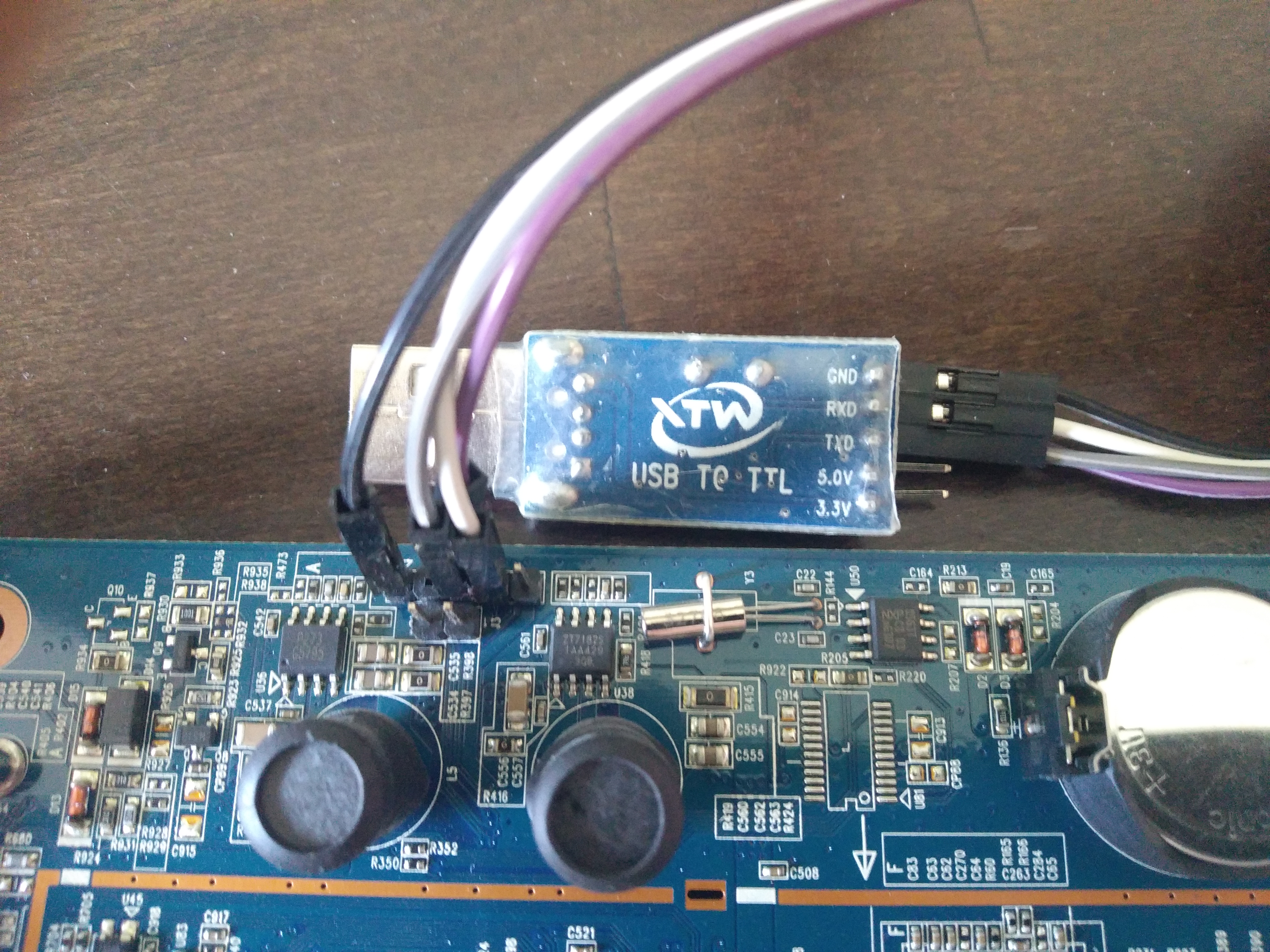
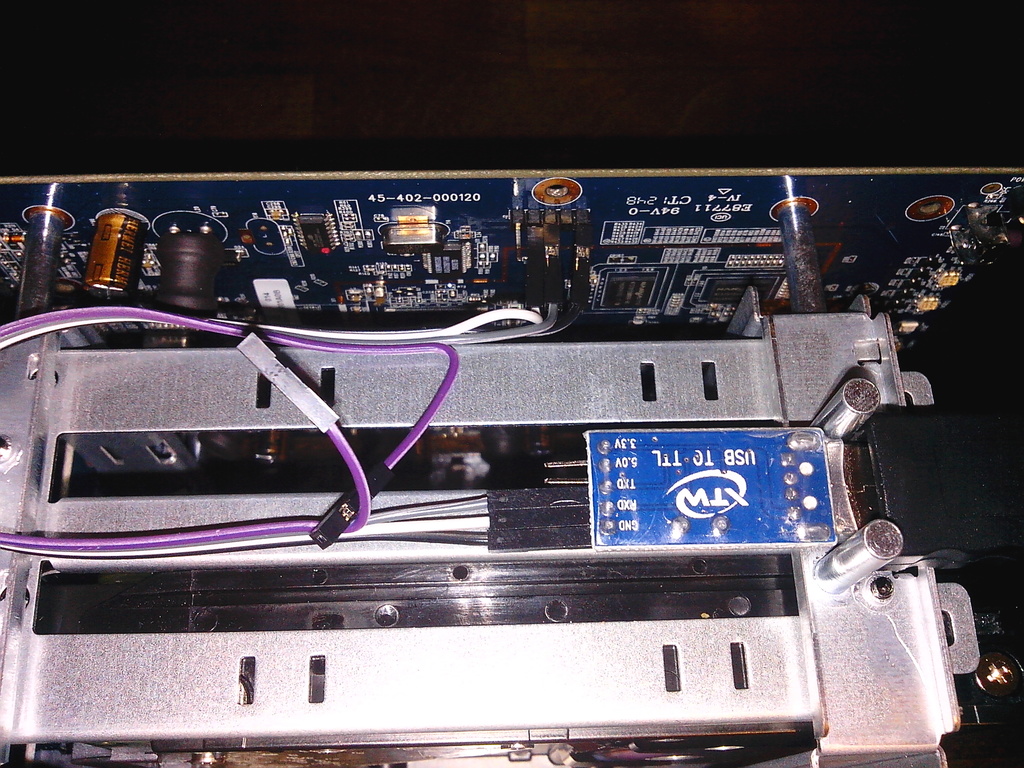
USB TTL to NSA-320
NSA325: http://dl.panticz.de/zyxell/tty_nsa325.jpg
NSA320: http://dl.panticz.de/hardware/zyxel_nsa320/nsa320_usb_ttl.jpg

install ssh
wget ftp://ftp.zyxel-tech.de/2.new_mirror/NSA310/4.40/zypkg/web_prefix -O /i-data/d154583a/admin/zy-pkgs/web_prefix
# firmware / package / reload
# install ffp
/i-data/d154583a/admin/zy-pkgs/ffp/ffp.log

ZyXEL NSA320
https://forum.doozan.com/read.php?2,88619

Update uboot
http://forum.doozan.com/file.php?3,file=160,filename=kwboot-tool.tar.gz,download=1
download: https://bitly.com/1W6D2pd

dhcp
tftpboot 0x800000 uboot.2017.07-tld-1.nsa325.mtd0.kwb
nand erase 0x0 0x80000
nand write.e 0x800000 0x0 0x80000
reset

Create USB boot disk
download: https://bitly.com/3zCSrnC

DEVICE=/dev/sdc

sudo umount ${DEVICE}*
sudo parted ${DEVICE} -s rm 1
sudo parted ${DEVICE} -s mklabel msdos
sudo parted ${DEVICE} -s mkpart primary ext3 0% 100%
sudo mkfs.ext3 ${DEVICE}1 -F -L rootfs
sudo mount ${DEVICE}1 /mnt
sudo tar xjf Debian-5.13.6-kirkwood-tld-1-rootfs-bodhi.tar.bz2 -C /mnt/
sync
sudo umount ${DEVICE}1

Boot from NAND (optinal)
https://forum.doozan.com/read.php?2,12096
download: https://bitly.com/3zCSrnC

ARM

SheevaPlug
http://www.panticz.de/SheevaPlug

PogoPlug
http://www.panticz.de/PogoPlug

Tegra (Toshiba AC100)
http://www.panticz.de/ac100

ZyXEL NSA320
http://www.panticz.de/ZyXEL-NSA320

Calxeda
https://wiki.ubuntu.com/ARM/Server/Install

DHCPD

Add static DHCP entry

# create new entry

uci add dhcp host
uci set dhcp.@host[-1].name='srv1'
uci set dhcp.@host[-1].mac='00:01:02:25:96:99'
uci set dhcp.@host[-1].ip='192.168.2.55'
uci commit dhcp

# restart dhcpd server
/etc/init.d/dnsmasq restart

Magento: Update custom core config data and refresh cache to view the changes

[embed_url: https://raw.githubusercontent.com/panticz/magento/master/scripts/update_stocklist_number.php]

Links
http://inchoo.net/ecommerce/magento/how-to-programmatically-change-magentos-core-config-data/
http://makandracards.com/magento/8277-cache-clearing-and-general-information

Ubuntu / Debian: Install and configure lm-sensors

<?php
$URL="https://raw.githubusercontent.com/panticz/installit/master/install.lm-sensors.sh";

echo "wget -q $URL -O - | bash -";
echo "<div><pre>";
</pre></div>

$c = curl_init();
curl_setopt($c, CURLOPT_URL, $URL);
curl_setopt($c, CURLOPT_RETURNTRANSFER, 1);

echo htmlspecialchars(curl_exec($c));

curl_close($c);

echo "";

?>

Search for motherboard configuration

sudo dmidecode  -t baseboard | grep "Product Name"

http://www.lm-sensors.org/wiki/Configurations/

Ignore sensors

# /etc/sensors.d/f71882fg-isa-0a00

chip "f71882fg-isa-0a00"
ignore fan2
ignore fan4

Motherboard configurations

# MSI X58 Pro-E (MS-7522) / Fintek f71882fg
echo "f71882fg" >> /etc/modules
echo "#coretemp" >> /etc/modules

modprobe f71882fg

wget http://dl.panticz.de/lm-sensors/ms-7522.conf -O /etc/sensors.d/f71882fg.conf

sensors -s

# ASUS M2N32 WS Professional
cat /etc/sensors.d/asus_m2n.conf 
wget http://dl.panticz.de/lm-sensors/m2n32_ws_professional.conf -O /etc/sensors.d/m2n32_ws_professional.conf
# SuperMicro PDSMi-LN4+
wget http://dl.panticz.de/lm-sensors/pdsmi-ln4.conf -O /etc/sensors.d/pdsmi-ln4.conf

View raw sensor data
sensors -u

# default config file

/etc/sensors3.conf

# view hardwired? fan alarm value
cat /sys/class/hwmon/hwmon8/device/fan1_alarm

OPTIONAL: check with icinga
/usr/lib/nagios/plugins/check_sensors

Links
http://www.lm-sensors.org/wiki/Configurations/MSI/X58-Pro-E
http://www.lm-sensors.org/wiki/FAQ/Chapter3#HowdoIsetnewlimits

Pagination

  • First page
  • Previous page
  • …
  • Page 27
  • Page 28
  • Page 29
  • Page 30
  • Page 31
  • Page 32
  • Page 33
  • Page 34
  • Page 35
  • …
  • Next page
  • Last page
Profiles GitHub StackOverflow LinkedIn Xing
Contact Imprint
© panticz 2026

Cookie-Einstellungen

Diese Website nutzt eingebettete Inhalte von Drittanbietern (z.B. YouTube, SoundCloud). Beim Laden dieser Inhalte werden Daten an die jeweiligen Anbieter übermittelt. Datenverarbeitungserklärung